Export and import Xero bank rules with a spreadsheet
Updated October 2026
Short answer: Xero can’t export or import bank rules. RuleMover, a browser extension for Chrome and Microsoft Edge, adds both: it exports an organisation’s rules to a CSV file you can open in Excel, and imports a CSV into another organisation, with a preview before anything is saved. Everything happens in your browser.
This is how firms keep one library of their common rules (bank fees, phone, power, fuel, office supplies) and load it into each new client, instead of rebuilding the same rules every time. You need RuleMover installed (install guide) and access to the Xero organisations.
1. Export the rules to a spreadsheet
- Open the Bank rules page of the organisation you want to export from, and open the RuleMover panel at the bottom right.
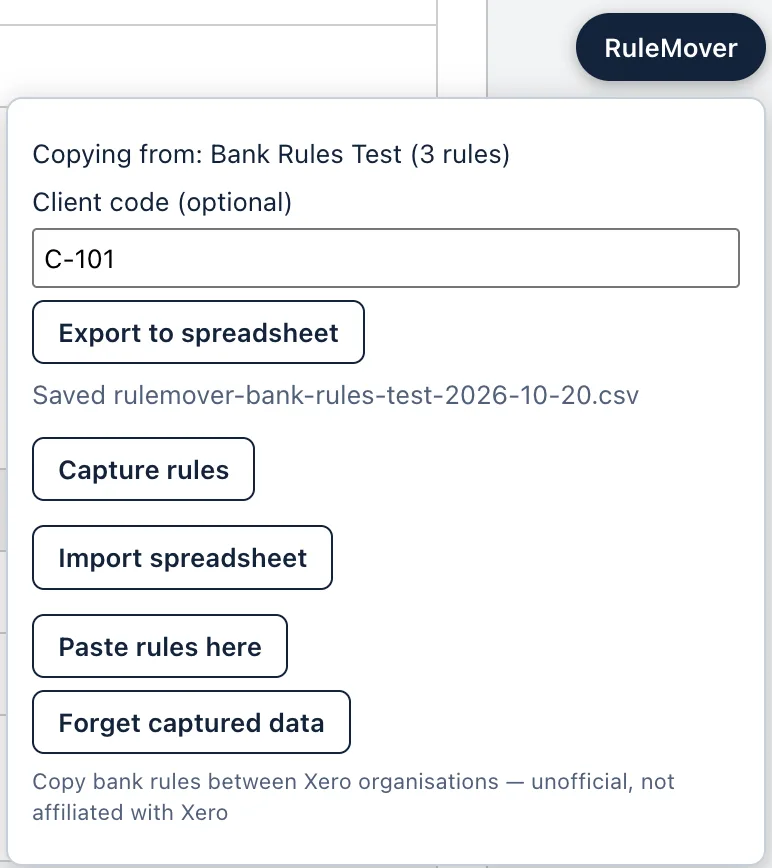
- Click Capture rules. RuleMover lists every spend, receive and transfer rule. Untick any you don’t want, then click Capture selected and keep the tab in front while it reads them.
- If you keep rules from several clients, type the client’s number or name in Client code. Then click Export to spreadsheet. The file goes to your Downloads folder.
2. What’s in the file
Each row is one line of a rule. A rule that splits a payment over two accounts has two rows, and its name, conditions and other settings repeat on both. The account code and the account name are in separate columns, so you can sort the library by account and spot differences between clients’ charts of accounts.
| Client | Client code | Exported | Rule name | Type | Conditions | Line kind | Account code | Account name | Tax rate | Amount |
|---|---|---|---|---|---|---|---|---|---|---|
| Smith Plumbing | C-101 | 2026-10-14 | Telstra | Spend money | Payee contains "TELSTRA" | Percent | 489 | Telephone & Internet | GST on Expenses | 100.00% |
| Smith Plumbing | C-101 | 2026-10-14 | Bank fees | Spend money | Description contains "ACCOUNT FEE" | Percent | 404 | Bank Fees | GST Free Expenses | 100.00% |
| Lee Cafe | C-102 | 2026-10-20 | Ampol fuel | Spend money | Payee starts with "AMPOL" | Percent | 449 | Motor Vehicle Expenses | GST on Expenses | 100.00% |
The file has 22 columns, in this order:
| Column | What it holds |
|---|---|
| Client | The Xero organisation the rule came from |
| Client code | What you typed at export (can be empty) |
| Exported | The export date |
| Rule ID | Xero’s ID for the rule. Leave it empty for rules you type in yourself |
| Rule name | The rule’s name |
| Type | Spend money, Receive money or Transfer money |
| Match | Any or All conditions |
| Conditions | Each condition as Field operator "value", separated by ; |
| Contact mode, Contact | How the contact is set, and the contact’s name |
| Line, Line kind | The line number, and Fixed or Percent |
| Description | The line’s description |
| Account code, Account name | The line’s account, in two columns |
| Tax rate | The line’s tax rate |
| Tracking 1, Tracking 2 | Category: Option |
| Amount | A fixed amount, or a percentage such as 100.00% |
| Transfer account | For transfer rules |
| Reference, Run on | The reference setting, and the bank account the rule runs on |
3. Build a library in Excel
- Combine clients. Export each client, then paste the rows (without the header row) under the first file’s rows. The Client and Client code columns keep track of where each rule came from. If an identical rule ends up in the library twice, it is copied only once.
- Edit freely. Change accounts, tax rates, names or conditions, and delete rules you don’t want.
- Add rules by hand at the bottom. Leave Rule ID empty and fill in at least Rule name, Type, Conditions, Line kind, Account code, Account name, Tax rate and Amount. For example:
Telstra,Spend money,Payee contains "TELSTRA",Percent,489,Telephone & Internet,GST on Expenses,100%. - Save as CSV. “CSV UTF-8” keeps accented names safest, but plain “CSV” works too.
Excel tips
- Excel shows account
090as90. That’s fine: the import still matches it to account 090. - Excel may show
100.00%as100%, and12.00as12. Both are read correctly. - Rows hidden by a filter are still saved in the CSV. To import only some rules, delete the other rows, or copy the filtered rows to a new sheet and save that.
4. Import into another organisation
- Open the organisation you want to fill (its dashboard or Bank rules page) and open the RuleMover panel.
- Click Import spreadsheet and choose your CSV.
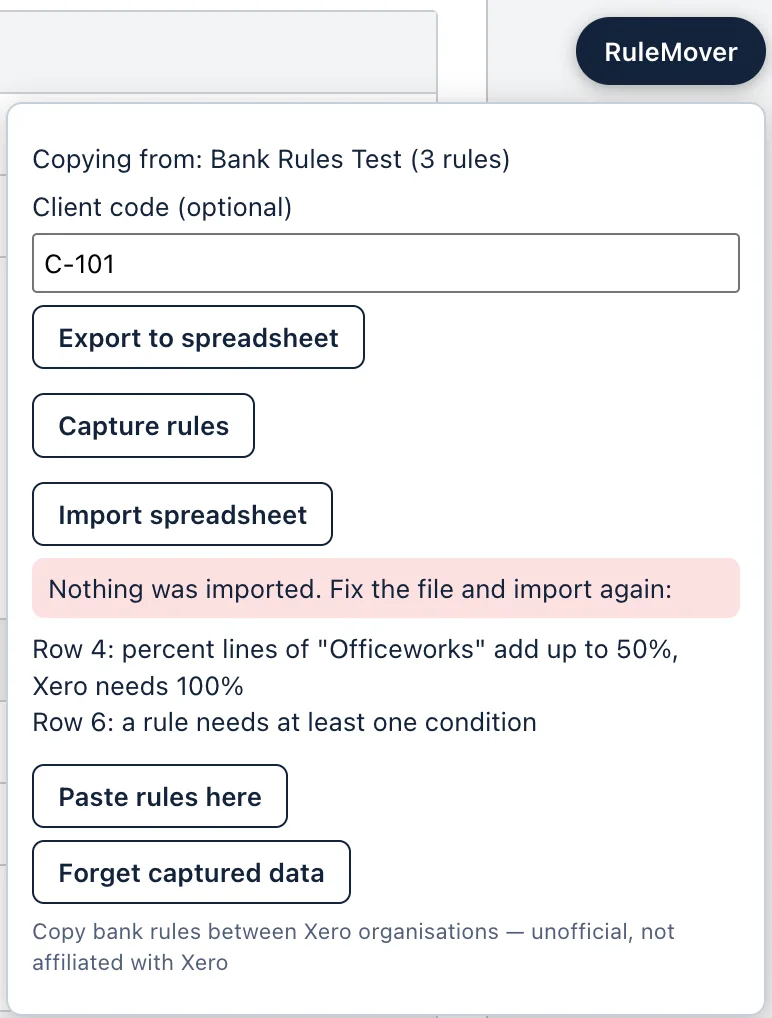
- RuleMover checks every row. If something is wrong, it lists the rows to fix and imports nothing, so a half-finished file never reaches Xero. Fix the file and import it again.
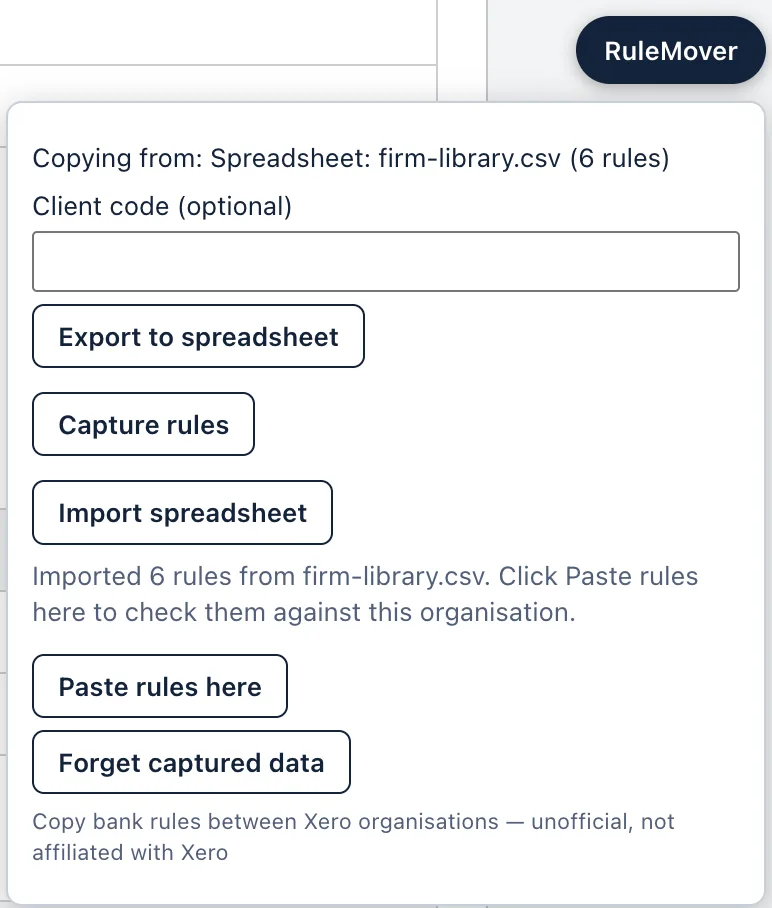
- When the file is clean, the panel says how many rules it imported. Click Paste rules here. RuleMover reads the organisation’s accounts, tax rates, tracking categories, contacts and existing rules, which takes about a minute.
5. Check the preview and copy
The preview shows every rule before anything is saved:
- Ready: everything it needs exists in this organisation.
- Needs attention: something is missing (an account, a tax rate, a tracking option), or a different rule with the same name already exists. Choose a replacement, tick Copy anyway, or skip the rule.
- Will be skipped: an identical rule already exists here, or the same rule appears earlier in your file.
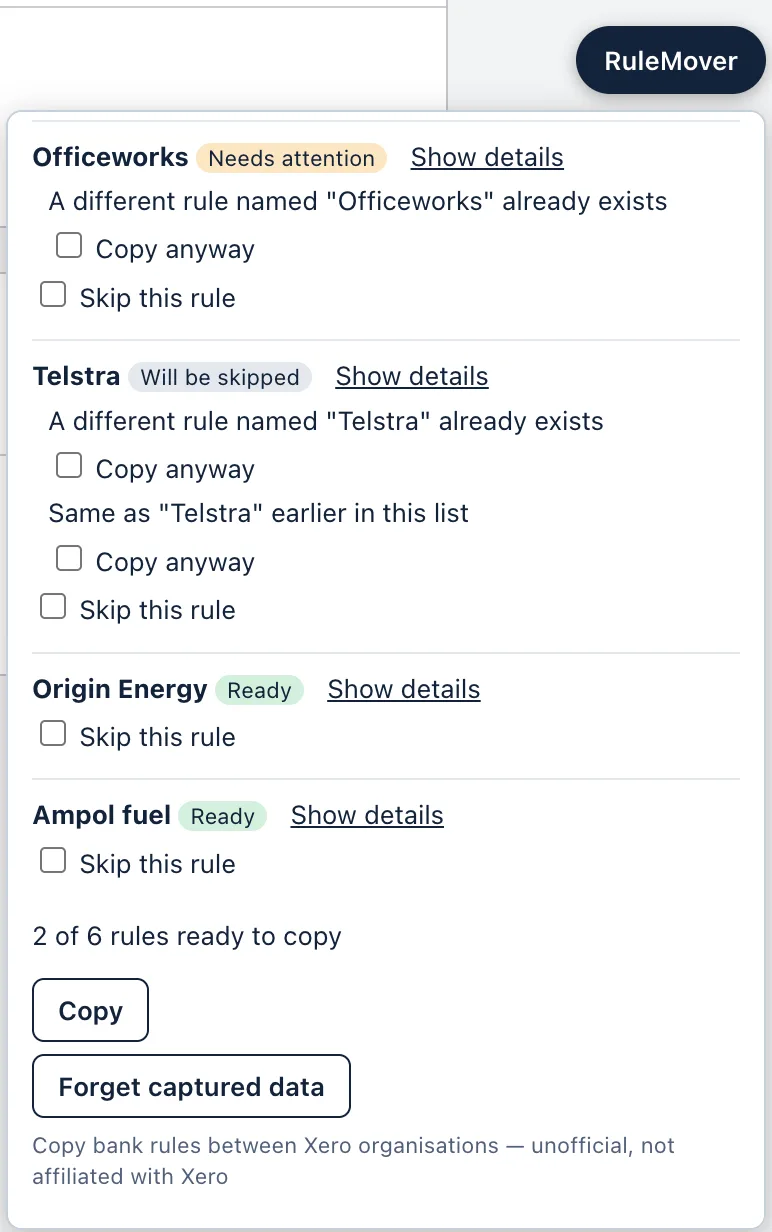
Click Copy and keep the tab in front. RuleMover fills in Xero’s own rule form for each rule, saves it, and reads it back to check it. Each rule takes about 20 seconds, and you get a list of what was saved at the end.
RuleMover costs A$29 for 12 months, and you can download it straight after payment. It also copies rules directly from one organisation to another, without a spreadsheet.
Get RuleMoverUnofficial, not affiliated with Xero.
Questions
- Can Xero export or import bank rules?
- No. Xero has no export or import for bank rules, and bank rules aren’t part of Xero’s public API. The most popular request for it on Xero’s ideas forum has over 500 votes.
- Is my rules file sent anywhere?
- No. RuleMover builds the CSV in your browser and saves it to your computer, and reads the file you import in your browser too. Nothing is sent to a RuleMover server. See the privacy notice.
- How long does an import take?
- Checking the file is instant. Copying takes about 20 seconds per rule, because RuleMover waits for Xero to save each one, so 250 rules take about an hour and a half. It runs on its own in a browser tab.
- What happens if a rule already exists in the organisation?
- An identical rule with the same name is skipped. A rule with the same name but different settings is flagged in the preview, and you choose whether to copy it anyway or skip it.
- Can I copy rules without a spreadsheet?
- Yes. Capture the rules in one organisation, open the other and click Paste rules here. See how to copy bank rules to another Xero organisation.